


This often-overlooked privacy setting on your Facebook profile can protect your identity and boost your security online

Here’s How to Hide Your Friends List on Facebook

Updated Feb. 01, 2024
For social media users with privacy concerns, sites like Facebook have a dark side. Your Facebook profile can reveal a lot of information about you, especially if you have lax privacy settings. That includes a few things you may have never thought twice about, like who can see your Friends list. While allowing others to see this list can pose problems on a personal level, it can also put you at risk for everything from harassment to identity theft. So if you’re looking for tech tips to beef up your online security, learning how to hide friends on Facebook is a good place to start.
“Facebook used to be great for finding friends and relatives we had lost touch with, but with the rise in online harassment, cybercrime and identity theft, it’s no longer always wise to keep profiles publicly available,” says Veronika Vebere, head of Demand Generation for Sendible, a social media branding agency.
Below, we’ll give you the lowdown on how to hide a Friends list on Facebook and take control of what you share online—and why you should. When you’re up to speed, learn more about Facebook’s other privacy features, including how to use Facebook’s secret conversations and how to tell if someone blocked you, as well as how to see who views your Facebook profile and your Instagram profile too.
What does it mean to hide your Friends list on Facebook?
With Facebook’s default privacy settings, the Friends section of your profile is public. This means that anyone can view your Friends list, from your closest friends and family members to strangers on the internet. Fortunately, Facebook users can adjust this setting to limit who can see the people they are connected with. By knowing how to hide friends on Facebook, you can restrict who sees this list to your Facebook friends, certain friends or only yourself.
Keep in mind that you can only control your own Friends list settings. If your friends keep their Friends section public, anyone can see that you are connected with them. This could lead to online harassment and stalking, according to experts. “People may not remember your full name,” Vebere says, “but they could remember who you used to hang out with and try to find you through their Friends lists.”
Jealous exes or other bad actors also might try to track down your account through a connection’s public Friends list on Facebook. From there, they could send you threatening or bullying messages. Plus, by using clues from your profile like photos or location tags, they might learn where you’ve been, stalk you or target you with a doxxing attack.
The solution? Try to limit your connections to people you trust to keep their Facebook Friends list private, Vebere says. Alternatively, you might also want to private your Facebook profile to protect your privacy.
Why would someone want to hide their Friends list on Facebook?
There are many benefits to learning how to hide friends on Facebook. Like the restrict on Instagram feature, this setting can protect your privacy, prevent your information from falling into the wrong hands and avoid leaving your loved ones vulnerable to Facebook scams.
“Any information containing a person’s full name, especially when accompanied by posts that include location tags and visual images, pose an increased risk,” Vebere says. “Bad actors don’t need much more than your full name [and] an exposing profile photo or post to do some damage.”
For example, cybercriminals can use your full name and profile photo to create a fake Facebook account impersonating you. If your Facebook Friends list is public, they could send messages to your connections, pretending to be you and asking them for money, sensitive information or other favors. Since the phony account uses real photos, criminals can fool your friends and family into thinking they are actually speaking to you.
FYI, other bad Facebook habits, such as taking Facebook quizzes and linking your phone number to your profile, could also put your information at risk.
How can I hide my Friends list on Facebook?
To learn how to hide friends on Facebook on your computer or smartphone, follow these steps:
On a desktop
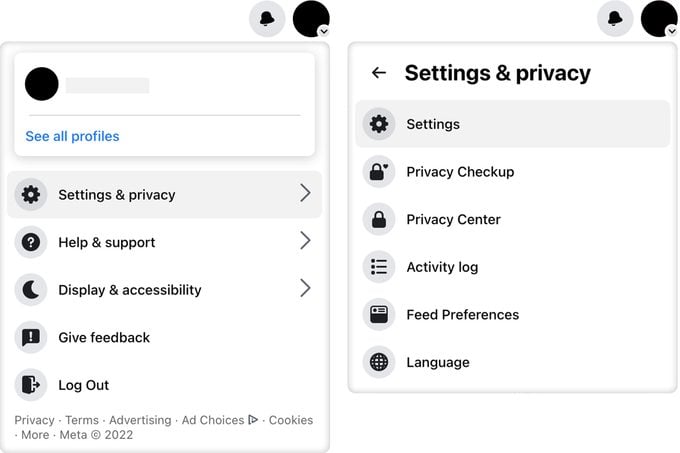
Step 1: Log in to your Facebook account, and click your profile picture in the top right-hand corner of your screen.
Step 2: Select “Settings & privacy,” then click on “Settings.”
Step 3: In the left-hand column, click “Privacy.”
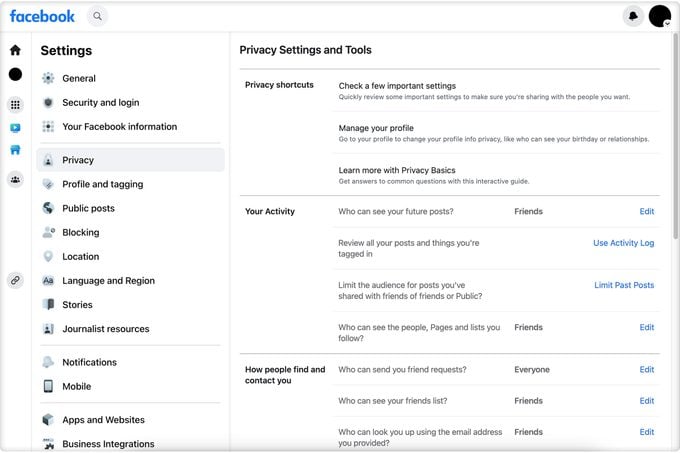
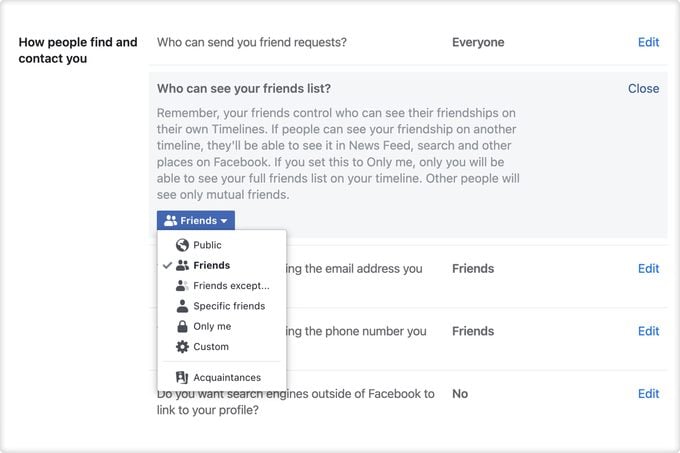
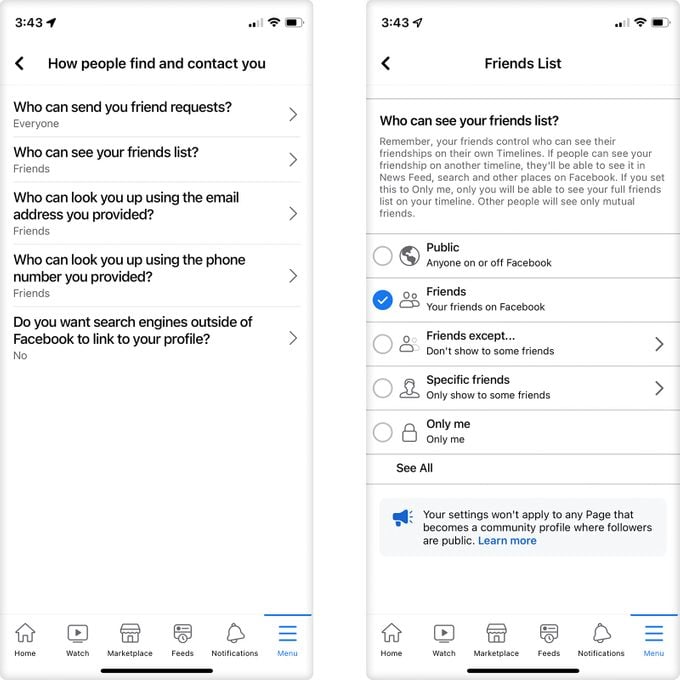
Step 4: Find the setting “Who can see your Friends list?” under “How people find and contact you.”
Step 5: Click “Edit” on the right.
Step 6: In the dropdown menu, select the group of people you would like to be able to view your Friends list: Friends, Specific Friends, Friends Except, Only Me or Custom.
On an iPhone or Android
Step 1: Open the Facebook app.
Step 2: Tap on the “Menu” icon on the bottom right-hand corner of your screen.
Step 3: Tap on the “Settings” icon in the top right.
Step 4: Under “Audience and visibility,” tap “How people find and contact you.”
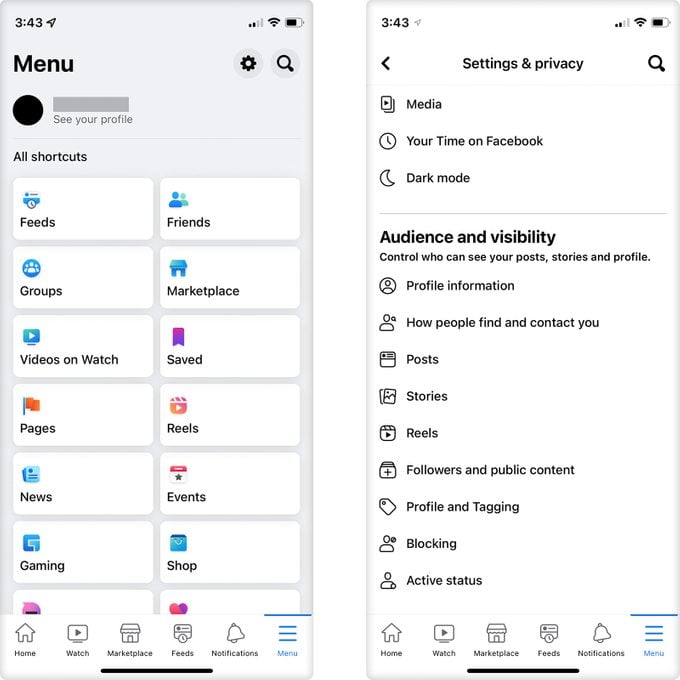
Step 5: Tap “Who can see your Friends list?”
Step 6: Select who you would like to be able to view your Friends list.
Keep in mind that these steps may be slightly different on older-model phones.
What does it mean if I can’t see someone’s friends on Facebook?
If you are friends with a Facebook user and can’t see their other friends on Facebook, they might have customized their profile to remove your access to their Friends list. Not seeing someone else’s friends on Facebook doesn’t necessarily mean that they’ve unfollowed or blocked you, though. More than likely, they changed their Facebook privacy settings to prevent users they are not connected to from viewing their Friends list. Next, learn how to change your name on Facebook.
Sources:

Originally Published: July 11, 2023

